

A plain-English setup guide to Gemini 3.8 Live and 3.8 Live Extended Thinking, with the real cost per hour and the two things the launch coverage got wrong.
You know that moment when you ask a voice assistant something slightly complicated and it just... goes quiet? You stare at the little pulsing circle. You say “hello?” like it’s a bad phone connection. Then it comes back with an answer to a question you’ve already forgotten.
Google says that moment is over. On September 15, it released Gemini 3.8 Live and Gemini 3.8 Live Extended Thinking, two voice models that can run tools and reason in the background while they keep talking to you.
Here’s my verdict, so you can stop reading if you’re busy. If you just talk to Gemini in the app, you don’t have to do anything. It’s rolling out to you now. If you build things, the rule is simple: Live talks while it fetches; Extended Thinking talks while it thinks. Start with plain 3.8 Live and only move up when your agent has to work through a hard problem mid-sentence. Budget about $1.38 for an hour of nonstop conversation at Google’s published rates, and expect more than that the moment the thinking version starts thinking hard.
Now the part that actually matters: what this lets you do that you couldn’t do last week.
The waiter who never leaves your table
Every voice assistant you’ve used until now has been a waiter who walks to the kitchen every single time you ask a question. Want the specials? He leaves. Is the fish fresh? He leaves again. You make small talk with the salt shaker.
The new model is a waiter who yells your order back to the kitchen while still standing at your table, telling you about the fish. The kitchen is the tools, the calendar lookups, the API calls, the deep reasoning. It’s all running in the background. The waiter never stops talking.
That’s the whole story. Google’s engineers call it asynchronous function calling. I call it the end of hold music.
Five things you can do now that you couldn’t do before
Ask for three things at once and keep the conversation going. Say “check the weather, pull up Thursday’s calendar, and while you’re at it, explain why my sourdough keeps collapsing,” and the agent starts the lookups and starts talking about your sad bread. When the tools finish, it folds the results back in. Before this, every one of those requests was a full stop.
Point your camera at something and talk about it while the agent works. Both models process visual input in near real time. Google’s launch demos show the model narrating a chess game and walking someone through a software onboarding flow using what’s on screen. If you’ve ever read an error message out loud to a support line, you know why this matters.
Switch languages mid-sentence and have it follow you. The models detect and switch among 97 supported languages during a conversation, automatically. Anyone who runs bilingual meetings knows the pain of assistants that lock onto one language and refuse to let go.
Hear progress instead of silence. This is the Extended Thinking specialty. It uses early verbal cues like “Let me check that...” and then narrates its progress while it works through multi-step tasks in the background. You still wait for the hard stuff. You just don’t wait in the dark.
Build a voice agent with one model instead of three. Most voice agents have been a relay race: one model to transcribe, one to think, one to talk back. Every handoff added delay. These are native speech-to-speech models, so the whole thing is one runner.
Which Gemini is which: the one table you need
Quick clarification before the table, because the names are a mess. There is no “Gemini 3.5 Live” conversation model. The 3.5 audio models are specialists: Gemini 3.5 Transcribe turns speech into text, and Gemini 3.5 Live Translate turns speech in one language into speech in another. The actual family tree for talking to an agent is 3.1 Flash Live, then 3.8 Live, then 3.8 Live Extended Thinking. Think of Live as the receptionist who can look things up while chatting, and Extended Thinking as the analyst who narrates while she works the problem.
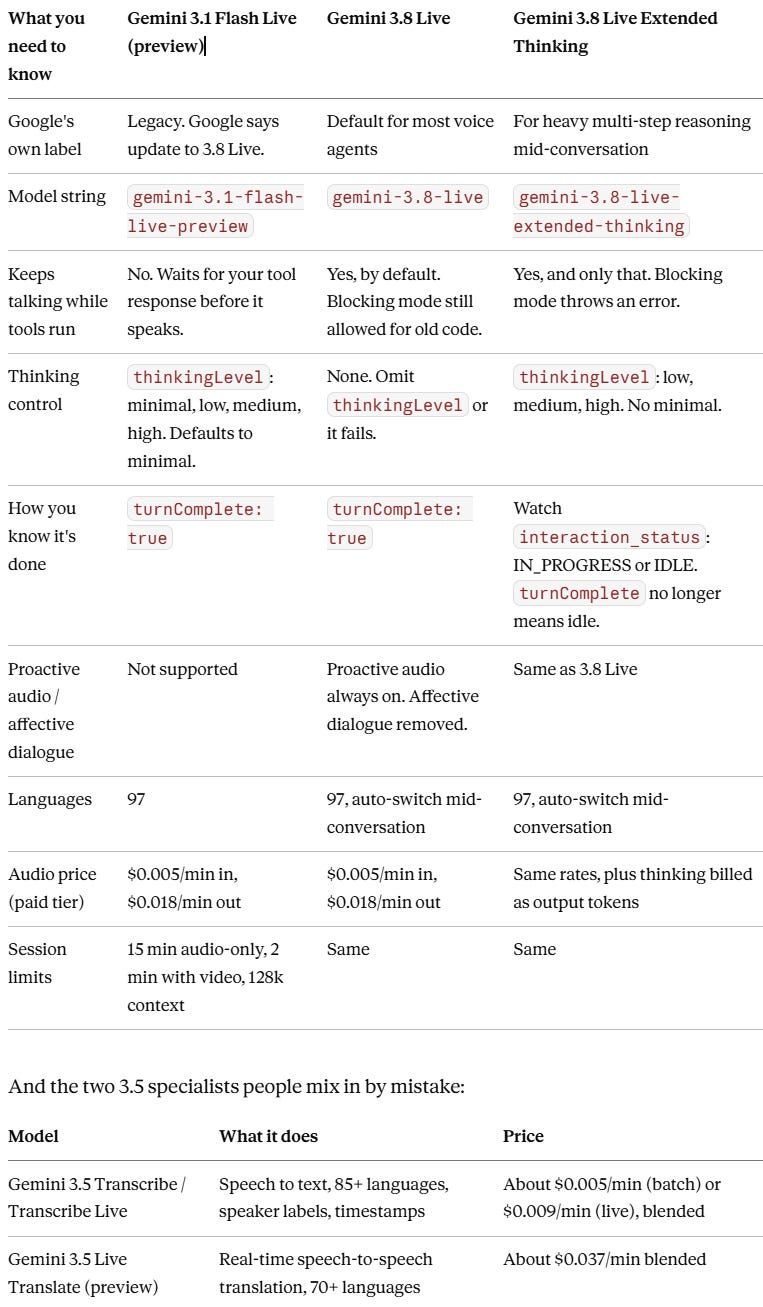
The short read: if you’re on 3.1, Google is telling you to move. If you’re starting fresh, take 3.8 Live and don’t touch Extended Thinking until your agent needs to think while it talks.
How to use it, path one: just talk
If you’re not a developer, your entire to-do list is “open the Gemini app and tap Live.” Extended Thinking started rolling out to Gemini Live on September 15. It’s also behind the new Gmail Live (talk to your inbox), Docs Live (draft and edit by voice), and Keep Live (take notes by talking). Search Live gets it too.
Rollouts are gradual. If your app still hangs when you ask something complicated, you haven’t gotten it yet. Give it a few days before you assume it’s broken. It’s the rollout.
How to use it, path two: build something
Step 1: Open Google AI Studio. Go to the Live playground and pick a model. There’s a free tier, and the catch on the free tier is that Google uses your content to improve its products. Switch to paid, and it doesn’t.
Step 2: Pick the right model. The model string is gemini-3.8-live for the default and gemini-3.8-live-extended-thinking for the heavy version. Google’s own docs say 3.8 Live is the default for most voice agents. Live talks while it fetches. Extended Thinking talks while it thinks. If your agent’s hardest job is looking things up, stay on Live. If its hardest job is reasoning, go Extended.
Step 3: Learn the four rules that will break your code. Nobody’s tutorial mentions these until you’ve lost an afternoon.
On Extended Thinking,
turnComplete: trueno longer means the model is done. It may still be reasoning or running tools. Watch theinteraction_statusfield instead:IN_PROGRESSmeans more is coming,IDLEmeans it’s actually waiting on you.Extended Thinking only allows asynchronous function calls (
behavior: NON_BLOCKING). Blocking mode returns a hard error. On plain 3.8 Live, async is the default, but you can still setBLOCKINGfor older code.thinking_level(low, medium, high) only works on Extended Thinking. Plain 3.8 Live rejects it, so remove it from your setup if you’re migrating.MINIMALisn’t supported on either.Proactive audio is permanently on. Affective dialogue is gone from the API. And video frames are sent to the model by default, so only send frames you actually need, because every frame costs money.
Step 4: If you’re migrating from gemini-3.1-flash-live-preview, swap the model string, strip out any thinking_level and enable_affective_dialog settings, and turn on output audio transcription if you need a text transcript. Audio is the supported response mode.
What it costs and who owns it
These are hosted, closed-weight models. No self-hosting, no open license. You rent them through the Gemini API, AI Studio, or Gemini Enterprise.
At Google’s published rates, audio input is $0.005 per minute and audio output is $0.018 per minute. Image and video input is $0.002 per minute. Text runs $0.75 per million tokens in and $4.50 per million out, and that output price includes thinking tokens.
So an hour where you talk the whole time and it talks the whole time is $0.30 plus $1.08, which is $1.38. That’s a ceiling for plain conversation, not a bill for Extended Thinking. Artificial Analysis, as reported by OfficeChai on September 15, measured 3.8 Live at about $0.84 per hour of input audio on its Big Bench Audio test and Extended Thinking at about $3.50. The gap is the thinking tokens. The more it reasons, the more you pay, and you can’t see the meter while it’s running.
Two more line items that sneak up on people: Google Search grounding gives you 5,000 free requests a month shared across all Gemini 3.x models, then $14 per 1,000. And those default video frames add up if you leave the camera on.
Claims vs. Receipts
Claim: Google didn’t publish per-minute pricing for these models. Shattered.io wrote on September 16 that Google hasn’t done so, leaving cost as “the biggest open question.” Google’s pricing page, updated September 15, lists $0.005 and $0.018 per minute in plain text. The receipt wins.
Claim: Google beat OpenAI on voice quality. The 82.6 score on Artificial Analysis’ Speech to Speech Quality Index belongs to Extended Thinking, not the standard model. OfficeChai, citing Artificial Analysis on September 15, puts standard 3.8 Live at 76.0. OrcaRouter argued the same day that, standard tier against standard tier, OpenAI’s GPT-Live-1 wins and “it is not close.” OpenAI’s own index number is disputed in the coverage: OfficeChai cites 81.5 for GPT-Live-1 Astra (Medium), while AutoInterviewAI cites 79.4. Treat any single OpenAI figure with suspicion until Artificial Analysis’ own page settles it.
Claim: Gemini is 13 times cheaper than OpenAI. AutoInterviewAI published that multiple times on September 16. Artificial Analysis’ measured cost per hour, via OfficeChai, shows 3.8 Live at $0.84 versus GPT-Live-1 Astra at $5.83, which is about 7 times. Extended Thinking at $3.50 is under 2 times cheaper. The multiple depends entirely on which tier you compare and how much reasoning you trigger.
So What
Do this: If you build voice anything, open AI Studio this week and run gemini-3.8-live with one async tool call. Watch what the conversation feels like when the agent keeps talking during the lookup. That’s the feature. Everything else is a benchmark.
Skip this: Don’t start on Extended Thinking. It costs more, it changes how “done” works in your code, and most agents don’t need it on day one.
Wait on this: Any head-to-head with OpenAI. The numbers in circulation don’t agree with each other yet. Give Artificial Analysis two weeks.
Steal this line: “Voice stopped being an input and became a place where work happens.”
For twenty years, talking to a computer meant talking, stopping, and waiting. Google just took the stopping out. Whether you build agents or just want your inbox to answer back, that changes what a conversation with a machine can be.
Receipts
The release
Google: Introducing Gemini 3.8 Live and 3.8 Live Extended Thinking (September 15, 2026). Backs the release date, the two-model positioning, 97 languages, background tool execution, and availability across the Gemini app, Workspace, and Search.
9to5Google: Gemini 3.8 Live Extended Thinking powers Gemini Live, Gmail, and Keep (September 15, 2026). Backs the Gmail Live, Docs Live, Keep Live details, the “Let me check that...” progress narration, and the rollout to Gemini Live.
Five things you can do now
Google for Developers: Build real-time voice applications with Gemini 3.8 Live and 3.5 Transcribe (September 15, 2026). Backs asynchronous function calling, configurable thinking, and the “alternative to cascaded architectures” claim.
OfficeChai: Google Releases Gemini 3.8 Live-Extended Conversational Model (September 15, 2026). Backs the chess narration and onboarding demo descriptions.
How to use it
Gemini API docs: Gemini 3.8 Live model page (updated September 15, 2026). Backs the model string, the “default for most voice agents” guidance, async-by-default with BLOCKING fallback, thinking_level rejection, proactive audio, affective dialogue removal, video frame defaults, and the migration notes.
Gemini API docs: Gemini 3.8 Live Extended Thinking model page (updated September 15, 2026). Backs the turnComplete change, interaction_status states, NON_BLOCKING-only function calling, thinking_level options, and the 131,072 input and 65,536 output token limits.
Google DeepMind: Gemini 3.8 Audio model card (September 2026). Backs the Gemini 3 Pro base and the multimodal input list.
Which Gemini is which
Gemini API docs: Live API capabilities guide, Model comparison (updated September 15, 2026). Backs every row of the three-model table: recommendations, thinking levels, async tool calling, the interaction_status change, session limits, context window, and the 97-language list.
Gemini API docs: Gemini 3.1 Flash Live Preview model page. Backs the 3.1 sequential-only function calling and the unsupported proactive audio and affective dialogue.
Gemini API docs: Pricing (accessed September 16, 2026). Backs the 3.1 and 3.8 audio rates and the 3.5 Transcribe and Live Translate blended rates.
What it costs
Gemini API docs: Pricing (accessed September 16, 2026). Backs the per-minute audio rates, per-token text rates, thinking tokens billed as output, free tier data-use terms, and Search grounding pricing.
MarkTechPost: Google Releases Gemini 3.8 Live for Production Grade Voice Agents (September 15, 2026). Backs the hosted-only, no-open-weights status.
Claims vs. Receipts
Shattered.io: Gemini 3.8 Live and Extended Thinking launch (September 16, 2026). The “no published per-minute pricing” claim.
OfficeChai: Google Releases Gemini 3.8 Live-Extended Conversational Model (September 15, 2026). Artificial Analysis figures as reported: 82.6, 76.0, 81.5, and the $0.84, $3.50, and $5.83 per-hour costs.
OrcaRouter: Gemini 3.8 Live vs GPT-Live-1 (September 15, 2026). The standard-versus-standard argument and the $4.47 to $5.83 per hour GPT-Live-1 estimate.
AutoInterviewAI: Gemini 3.8 Live vs OpenAI GPT-Live-1 (September 16, 2026). The 13x claim and the 79.4 figure.