


Every AI tool I’ve ever used has the same personality flaw. You close the tab, and it just sits there like a dog staring at the front door. It does absolutely nothing until you come home and type something.
On September 29, OpenAI tried to fix that.
By the end of this, you’ll know which DevDay launches you can use today and what each one really costs to run. You’ll also have a job description you can paste into your first Dot tonight.
My verdict: stop reading DevDay as five announcements, because it’s one. OpenAI built an AI worker that keeps going after you log off. Then it gave that worker four supporting pieces:
GPT-6.1 Sol: a cheaper brain.
Ultrafast: a paid fast lane.
The Agents API: a developer version.
ChatGPT Space: a shared place to keep its work.
The worker is the story. Everything else is what a worker needs to hold down a job.
First, a decoder ring
OpenAI names products the way bands name albums, so here’s a quick translation.
Dot: an always-on agent inside ChatGPT. It runs on GPT-6 Astra, OpenAI’s top model, and it has its own cloud computer and browser. You give it a responsibility, and it keeps working on it between your conversations.
GPT-6.1 Sol: a cheaper model that gets close to Astra on hard work.
Ultrafast: a speed setting you pay extra for. You get the same Astra, just faster.
Agents API: the developer version of the machinery that runs Dots and Codex.
Space and Pages: a shared workspace. A Page is a document that you and ChatGPT can both edit, like a Google Doc that talks back.
For the two model choices, use Sol when nobody’s waiting on the answer. Use Ultrafast when somebody’s staring at a loading spinner.
1. What’s Live Today
Launch week is when the internet confidently tells you you have features you don’t. So here’s the real status as of Sept. 30.
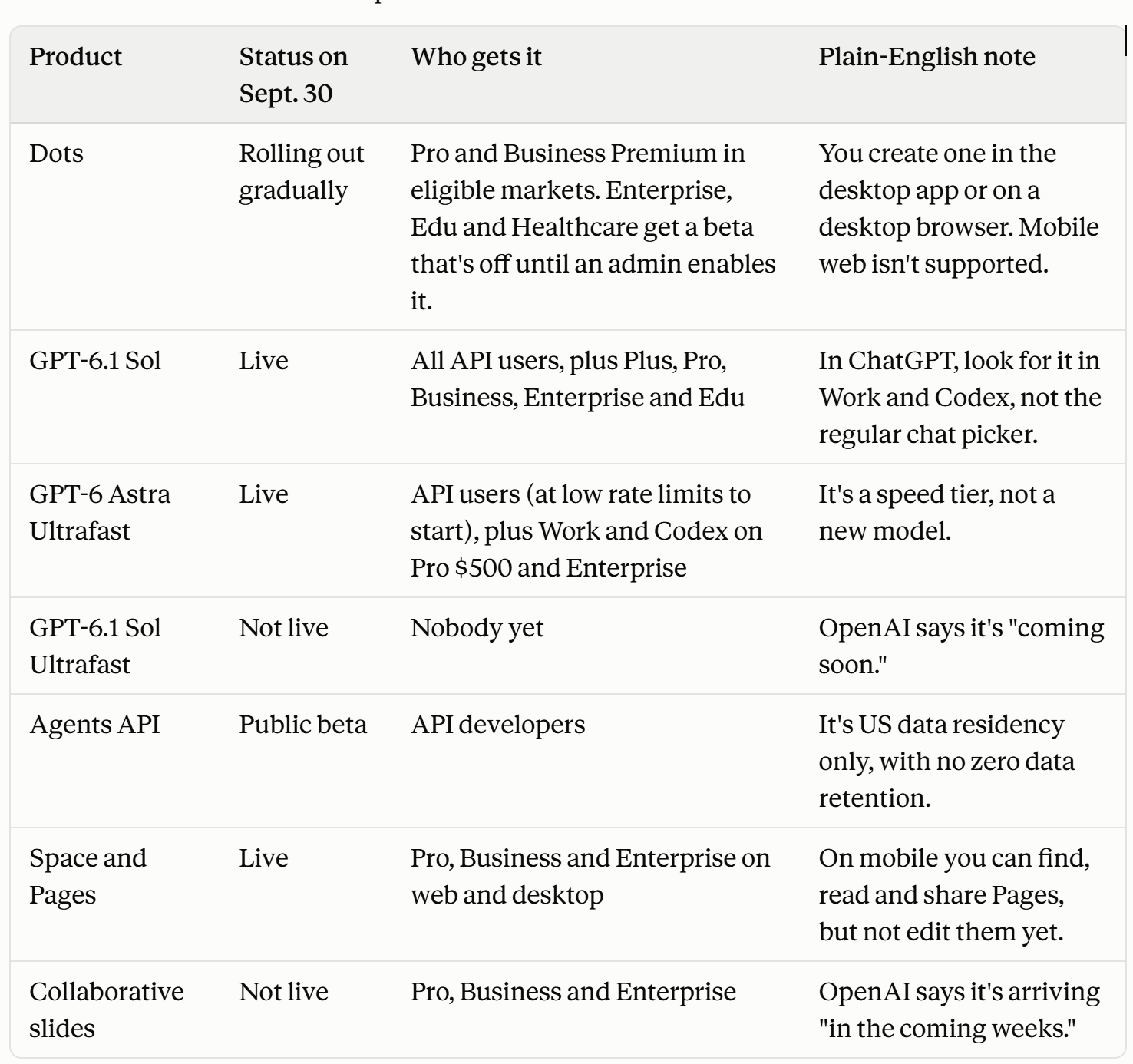
Two things to know before you go digging through your settings.
First, the Dots rollout is gradual even on eligible plans. If you don’t see it yet, you didn’t break anything.
Second, even OpenAI had a rough morning. Several voice demos stalled onstage, and the presenters switched to typing. That’s the most relatable thing I’ve ever seen at a keynote.
2. Before and Now: What You Couldn’t Do Last Month
I want to be honest about something the hype posts will skip. OpenAI didn’t invent persistent agents on Tuesday. Developers could build most of this last year if they had a spare month, a cloud bill, and a high pain tolerance. What changed is that you no longer have to build it.
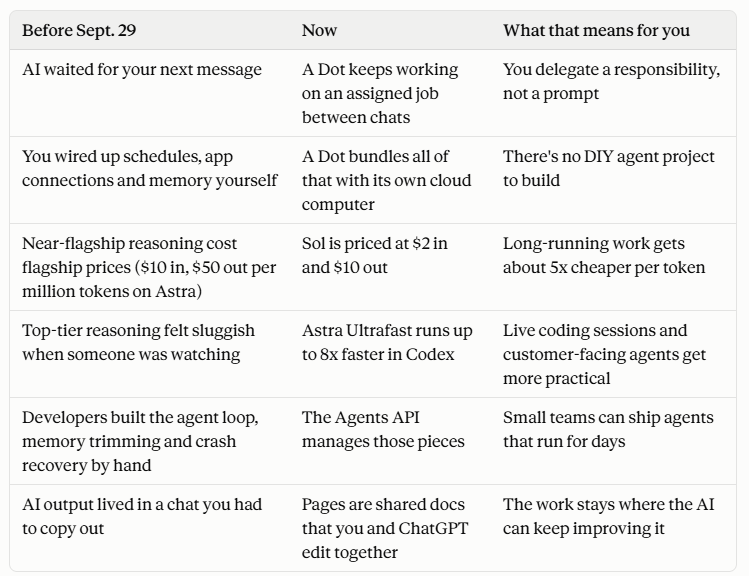
Tables don’t have feelings, so here’s what this looks like in real life.
A freelancer gives a Dot the job of watching client emails for deadline changes and drafting follow-ups. They wake up to a list instead of a panic attack.
A small shop owner has one check supplier messages every weekday morning and flag price increases before they hit the invoice.
A parent planning a family trip hands it the flight and hotel emails. The Dot keeps the itinerary current and flags anything that changes.
A two-person startup uses the Agents API to build a support agent that remembers each customer’s case across days. They don’t have to build the memory system themselves.
3. A Copy-Paste Job Description for Your First Dot
OpenAI lets you customize your Dot’s name, shape, color, eyes, glasses and accessories. That’s adorable. It’s also the least important decision you’ll make. (I’d still spend twenty minutes on the glasses. I know who I am.)
The decision that matters is the job description. OpenAI’s own setup guide tells you to start with work you want the Dot to keep track of, instead of treating each conversation as a fresh request.
So write it like you’re onboarding a new hire. Cover six things:
The ongoing responsibility.
Which apps and sources it should watch.
What it can decide on its own.
What it must bring to you.
How finished work should come back to you.
What’s important enough to interrupt you.
Here’s one you can steal and edit:
Your ongoing job is to keep my client work from slipping. Watch my email and calendar for new requests, deadline changes and unanswered questions, and keep a running list of open items with due dates. Every weekday at 8 AM Eastern, message me a short summary in ChatGPT. Draft replies for my review. Never send an email, accept a meeting, pay for anything or delete anything without my approval. Interrupt me only if a deadline is less than 48 hours away and nothing has moved. Confirm this schedule back to me.
My rule of thumb: give it lots of room on anything you can undo, like research, sorting, and drafting. Make it ask first on anything you can’t undo, like sending, paying, deleting, or sharing.
Connecting your own computer is a separate switch in the desktop app. Leave it off until the Dot has earned it, the same way you don’t hand a new hire your house keys on day one.
One cost detail people will miss. OpenAI says chatting with your Dot doesn’t count toward your ChatGPT usage limits. Work that it hands off to ChatGPT Work, or Codex, does count as usual. Talking is free. Delegating isn’t.
4. The Real Cost Table
All five launches are paid and proprietary. There are no open weights and nothing to self-host.
One nuance: OpenAI says the Codex harness underneath Dots and the Agents API is open source. The hosted version you’d actually use is still billed like everything else.
OpenAI API prices per million tokens, for prompts under 272K input tokens, as of Sept. 30, 2026:
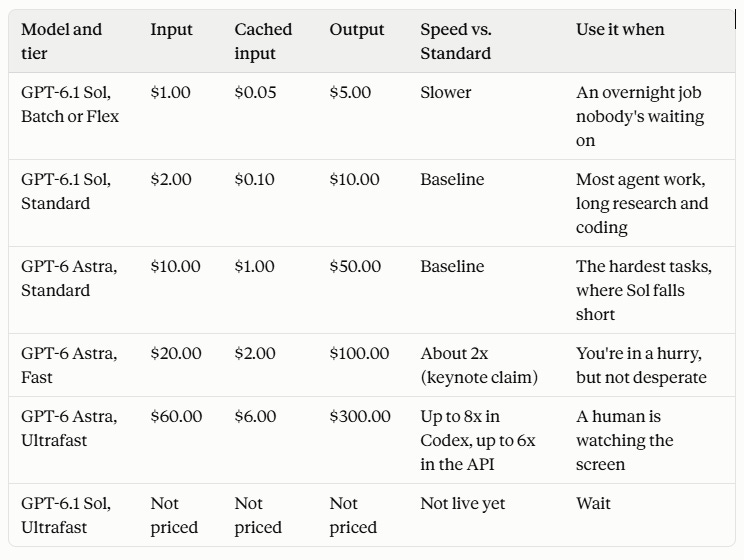
What actually drives the bill:
Output is where the money goes. Reasoning tokens bill at the output rate. Per Artificial Analysis, a Sol task costs $0.13 at low effort and $0.72 at max effort. That’s more than five times as much for the same model.
Long prompts reprice everything. Go over 272K input tokens, and Sol bills the whole request at $4 in and $15 out. The 1.05 million-token context window is a ceiling, not an invitation.
Caching is the quiet hero. Context you reuse, like a long set of standing instructions, bills at $0.10 per million on Sol. That’s 5% of the normal input rate, and it’s what makes always-on agents affordable.
The Agents API has no separate platform fee. You pay model rates, tool rates, and container time. OpenAI-hosted sandboxes start at $0.03 per 20-minute session.
Ultrafast inside ChatGPT needs the $500 Pro plan or eligible Enterprise. That’s per OpenAI’s recap. The same plan comes with 25 times the Plus usage allowance.
Per-task cost matters more than per-token cost. A cheap model that needs three tries can cost more than an expensive one that nails it the first time.
5. What They Said vs. What the Tests Showed
Claim: GPT-6.1 Sol delivers near-Astra intelligence at a fifth of Astra’s token prices (OpenAI, Sept. 29). OpenAI reports that Sol matches Astra on its DeepSWE coding test at roughly one-fifth the cost. It also reports that Sol lands within 2.1 points of Astra on the OSWorld 2.0 computer-use test, at about one-seventh the cost per task.
The evidence: Artificial Analysis scored Sol 51.8 on its Intelligence Index, against 52.7 for Astra, at $0.72 per task vs. $3.26 (Sept. 30). That’s about 22% of Astra’s cost for less than one point of difference. This one holds up.
Claim: Ultrafast is up to 8x faster (OpenAI keynote and API guide, Sept. 29).
The evidence: OpenAI’s own recap specifies up to 8x in Codex and up to 6x in the API. BenchLM’s review (Sept. 29) points out that generation speed isn’t the same as total task time, because agents still wait on tools, tests, and network calls. As of Sept. 30, I haven’t found an independent speed test. Treat 8x as the best case.
Claim: Sol is a near-Astra substitute for agent work (OpenAI’s positioning, Sept. 29).
The evidence: OpenAI’s own system card for Sol reports one test of whether a model respects warnings. Sol kept going past the warnings in 23.5% of runs, vs. 17.4% for Astra (Sept. 29). That test ran without the production controls meant to stop this behavior, so it’s a lab number, not a field number. Still, if you put Sol behind an agent that can take actions, tighten the approval rules.
The bigger thing
For most of us, the hardest part of work isn’t the hard thinking. It’s remembering to send the follow-up, and noticing that a deadline moved in an email you skimmed at 11 PM.
For years, AI has been brilliant at the thinking and useless at the remembering. That’s because it only existed while you were typing.
Dots are OpenAI’s bet that the next useful thing is a helper that’s still paying attention after you’ve stopped. A Dot might make you a little less tired. I’ll take that trade over another benchmark win any day.
Do this: If you have Pro or Business Premium, give a Dot one small, boring, bounded job this week, like tracking a single project’s deadlines. Judge it on whether you can check its work, not on whether it feels magical.
Skip this: Ultrafast for background jobs. Paying 6x for speed nobody sees is like paying for overnight shipping on a package you won’t open until Christmas.
Wait on this: Sol Ultrafast and collaborative slides, which aren’t live yet. Also wait on the Agents API if you need EU data residency or zero data retention.
Steal this line: “Chatbots wait for a prompt. Dots have a job.”
Go give your AI a job. Then go do something it can’t, like calling your mom back. I’ll see you in the next one.
Sources
Opening and decoder
OpenAI: DevDay 2026 Recap (Sept. 29, 2026). Backs the launch date and Dots availability on Pro and Business Premium. Also backs Sol’s availability and its “fifth of the price” positioning, Ultrafast’s up-to-8x (Codex) and up-to-6x (API) speed claims, Space and Pages availability, the collaborative slides timing, and the Pro 500 plan with 25x Plus usage.
ChatGPT Learn: Get started with your dot (accessed Sept. 30, 2026). Backs Dot creation on desktop only, the customization options, the separate computer connection, and scheduled check-ins.
1. What’s Live Today
OpenAI API docs: Ultrafast mode (accessed Sept. 30, 2026). Backs Astra Ultrafast being broadly available at low rate limits, and support for US data residency and global processing only.
OpenAI API docs: Agents API overview (accessed Sept. 30, 2026). Backs the managed Codex harness, US-only data residency, no zero data retention, and billing at model, tool, and container rates.
BenchLM: What OpenAI announced at DevDay (Sept. 29, 2026). Backs the stalled voice demos, Dot conversations not counting toward usage limits, and the 4,000+ app claim.
2. Before and Now
ChatGPT Learn: Work with pages (accessed Sept. 30, 2026). Backs Pages as documents you edit directly or with ChatGPT, with real-time co-editing.
4. The Real Cost Table
OpenAI API docs: Pricing (accessed Sept. 30, 2026). Backs every tier price in The Real Cost Table and the $0.03 container session rate.
OpenAI API docs: GPT-6.1 Sol model page (accessed Sept. 30, 2026). Backs the 1.05M context window, the 272K repricing rule, and cached input at 5% of the input rate.
Artificial Analysis: GPT-6.1 Sol (low) (accessed Sept. 30, 2026). Backs the $0.13 per task figure at low effort.
5. What They Said vs. What the Tests Showed
OpenAI: Introducing GPT-6.1 Sol (Sept. 29, 2026). Backs the vendor DeepSWE and OSWorld 2.0 claims.
Artificial Analysis: GPT-6.1 Sol (max) (accessed Sept. 30, 2026). Backs the independent Intelligence Index scores and cost per task for Sol and Astra.
OpenAI Deployment Safety Hub: GPT-6.1 Sol system card (Sept. 29, 2026). Backs the 23.5% vs. 17.4% warning-persistence figures.